Run for treasure.
Play it with your ears.
Treasures spawn on the real paths around you, and the sound tells you where — left or right, ahead or behind, closer and warmer. Get to one before its timer runs out and it's yours. Eyes on the road, phone in your pocket, the whole time.
Hear a treasure hunt — wear headphones
The app's actual sounds and its actual voice: pings cut through the music as you close in, the coach speaks — the track ducks under him — and everything stops for the find. (Track composed for this clip; on a run it's your music.)
In private beta on iPhone and Android · free during beta
iPhone (iOS 16.4+) or Android 8+ · Apple Watch optional · works with any stereo headphones
The hunt
A running game designed for ears, not screens
Most running apps assume you'll look at them. Cologra assumes you won't — and builds the entire game out of sound.
A radar that knows front from back
The ping sits out in the street rather than inside your head, rises in pitch as you close in, and sounds different ahead of you than behind. Close your eyes and you know which way to turn.
A coach that speaks when it matters
Whether a chase is still winnable, when to let one go, when your own stride says you're tiring — and if one gets away, why. "You ran right past that rare treasure — you got within 12 meters of it." No chatter, no filler.
Your music stays yours
The coach ducks your music while he talks, then hands it straight back. Cues ride over the top without touching it. Playback is never paused.
Built for blind runners too
Eyes-free by design means screen-reader and voice-query support isn't an afterthought — it's the same product. Testing with blind runners is underway; tell us what we've missed.
The rings are the tier. The tier is the whole truth.
Every treasure pays out in XP, and every payout is honest. One ring is common, two are rare, three are epic — and the tier alone sets the reward. What the tier doesn't set is how hard it'll be: the deadline is priced against your measured pace, the hill you're on, and whether you're running or walking. Rarer means a tighter window and a pace the find demands. And you don't just stumble on an epic — you earn the sight of one, then run it down.
Common
The bread and butter. A find on almost every run.
Rare
Tighter deadline, further out. The coach tells you — honestly — if it's still winnable.
Epic
A window you have to earn at a pace you have to hold. Worth the chase.
And not every treasure asks the same thing. Most want you there before the clock runs out. Some want you to hold the pace once you arrive — six seconds at the tier's tempo, and it's yours. Others say nothing at all until you're almost standing on them, and reward covering ground rather than following a sound.
The game will not send you across traffic. A treasure on the far side of a road with no mapped crossing is quietly dropped from the radar rather than dangled — no ping, no coaching — and where there is a crossing, the coach points you at it. After dark, the reminder before you set off changes, because being seen matters more than hearing.
Ways to play
Compete with the only people who matter
Send a run as a race
Finish a run, send it to a friend. They open it and their next run is against your ghost — on their own route, in their own city. They'll hear how far ahead or behind they are, and when you found your treasures. The file carries your pace and nothing else: no route, no map, not even your name. No account, no server, no one else involved.
Race your own ghost
Start from a familiar spot and you're up against your last run from here — "You're 30 meters ahead of your ghost." No leaderboards, no strangers.
Explore every street
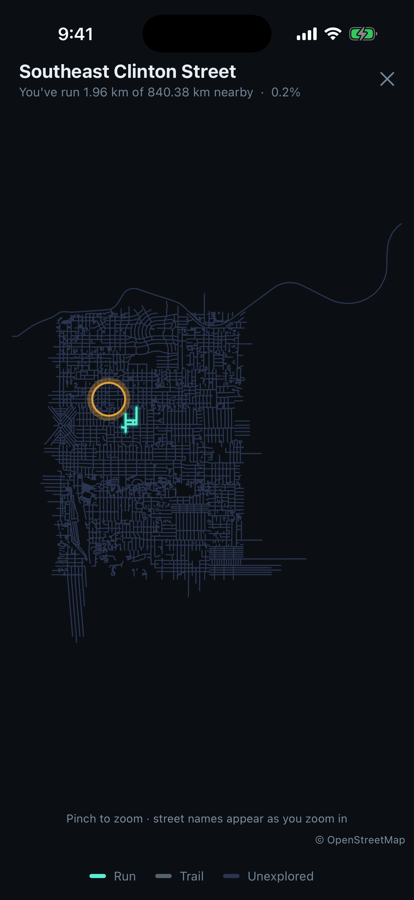
The app knows which paths around you you've never run, tells you where the unexplored ground is, and draws your coverage map — computed entirely on your phone. Cover an area and the badge is yours, and the next one opens: Local → Neighbour → Well travelled → Citywide. Finish it and the app says what no other running app can: "You've covered every area we track. Genuinely."
Train for something
Set a target — two miles in 18:00 — and the app fits your critical speed from your own runs, tells you the pace it needs, and projects when you'll get there. Structured sessions are built around your numbers, not a table. And when a run breaks a barrier, the recap says so: "And your 10 kilometers just went under 1 hour."
Walk it instead
Switch to walking and the whole game comes with you: treasure deadlines scale to your pace, so a find stays reachable at 3 mph. The coach stops treating a walk as a break, and the sessions become walks. Not a lesser mode — the same hunt, slower.
Treadmill mode
No GPS, no problem: distance comes from your own stride, calibrated to the machine — and treasures still spawn ahead of you on the belt, deadlines and all.
Hands-free
Your wrist already knows
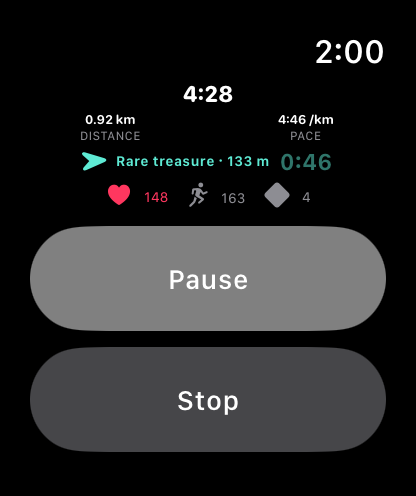
Pair an Apple Watch and the run comes to your wrist: time, distance, pace, cadence — and the radar, showing which way the treasure lies and how long is left. The arrow only appears when the app genuinely knows which way you're facing, because a confident wrong arrow is worse than none. Finds tap you on the wrist. Pause, resume or stop without touching your phone; stopping asks twice, so a stray tap can't end your run.
Wear a strap, or just the watch, and your heart rate reaches the coach live — it eases you off a chase you shouldn't be pushing. It's shown to you and read by the coach, and that's all: never saved with the run, never written to a health app by the watch, never sent anywhere.
No watch? The chase lives on your lock screen instead — the tier, the distance, the countdown, ticking without unlocking anything.
Ask. Don't even open the app.
Cologra answers Siri directly — spoken replies with your phone still in your pocket:
- "Hey Siri, how am I doing in Cologra?"
- "Am I on track in Cologra?"
- "Where should I run with Cologra?"
- "How's my run going in Cologra?" — mid-run: distance, pace, treasures, your ghost
- "Pause my Cologra run" — works with the phone locked in your pocket
Starting a run, a workout or setting a goal works by voice too — those open the app to do it. On Android, long-press the icon for the same quick commands: start a run, goal check, where to run.
Proof
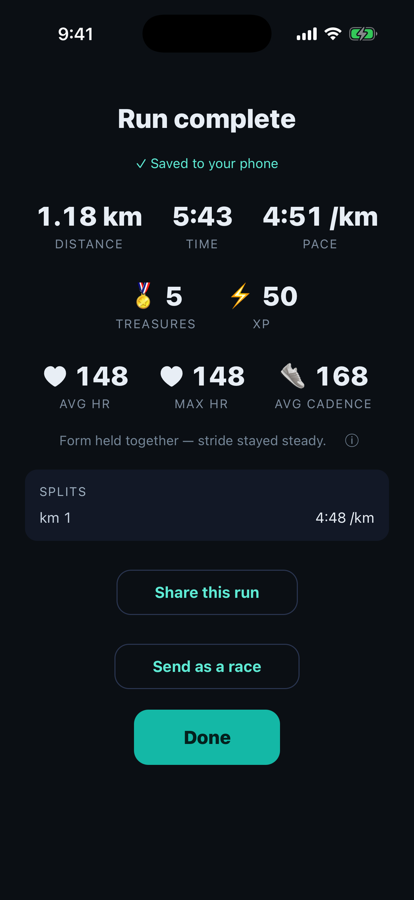
Here's what it looks like when you do look
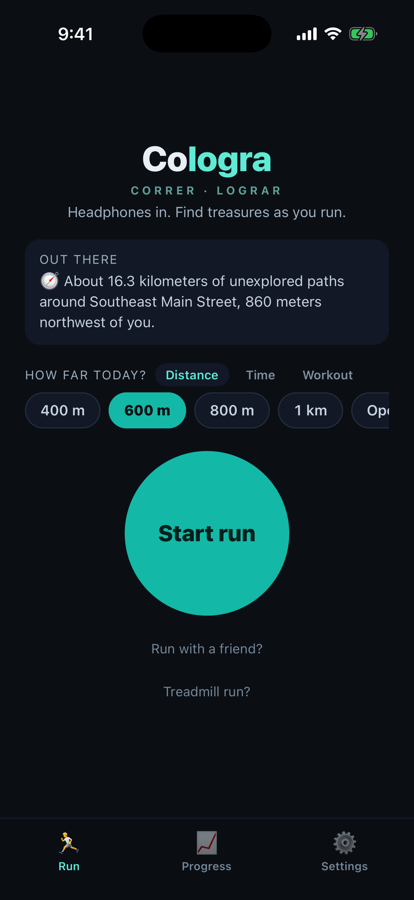
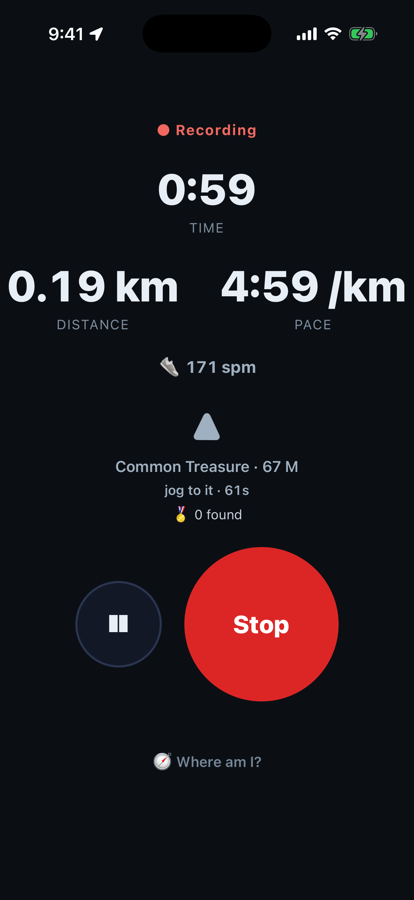
Pick a distance and go. Everything that matters mid-run reaches you through your ears — the screen just backs it up, in big type you can read at a glance.
Privacy
Your runs never leave your phone
Not "we take privacy seriously." Architecturally, literally: Cologra has no accounts, and nothing about your runs is sent to us. Routes, times, fitness — all of it lives on your device and nowhere else. Optional backup goes to your iCloud Drive on iPhone, or a folder you pick on Android — off by default, and it takes your whole record with it: runs, routes, the treasures you've found and where, and the fitness the app has measured.
Want in?
Email us and we'll reply with the download link, usually the same day. Free during the beta — your feedback is the price. Tell us your phone and whether you run with headphones.
Ask for an invite
or write to support@vortas.io
Interface in 19 languages, 16 with a downloadable coach voice. The name is the mission: correr + lograr — run, achieve.